TABLE OF CONTENTS
> What NAMIEasySite Does for You
Examples:
> What default records does NAMI EasySite add for
us?
> I (or my IT person) would like access to our DNS records. How
do I do that?
NAMI EasySite adds DNS records for you as part of your subscription!
As part of your subscription, we will add or change any type of DNS record needed, for example to facilitate domain verification, improve email delivery, set up or change email services, connect a third-party service and so on.
Records we add or modify include TXT, CNAME, MX, A records, SRV, SPF and some others.
Normally your NS records will not change unless you are moving away from the NAMIEasySite platform.
You may need DNS records added or changed for third-party services such as Bloomerang or Mailchimp, or if you are getting new email@youraffiliate.org such a Google for Nonprofits or Microsoft for Nonprofits; or changing email providers; or for many other reasons.
When sending in a DNS record request, please let us know the Record type (TXT, CNAME, etc.) and paste in the record value(s) rather than sending a screenshot.
We generally turn these around in 60 minute or less during business hours.
If you prefer to manage this yourself and don't have access to your DNS let us know and we'll get you added.
Google
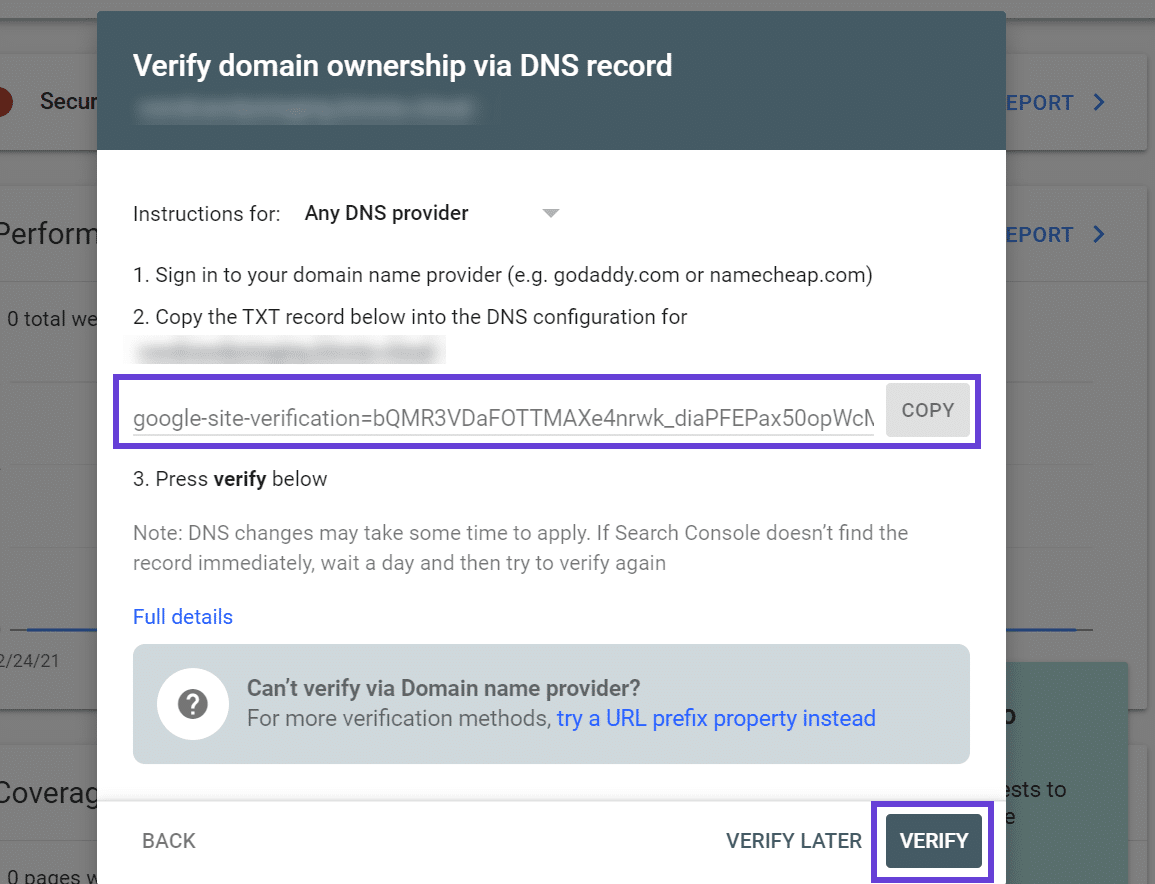
Here's an example of a Google Verification record - and you can see that not all of the value is visible in the box, so you need to copy the whole value and paste it in an email to us.
Record
Type: TXT
Record
Value: google-site-verification=bQMR3vDAFOTTMAXe4nrwk_diaPFEPax50opWcN...
Mailchimp
And here is an example of MailChimp's CNAME records. For this image example, you would send us the data like this:
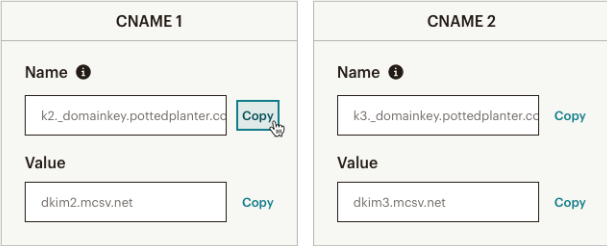
Record 1 type: CNAME
Name: k2._domainkey.pottedplanter.com
Value: dkim2.mcsv.net
Record 2 type: CNAME
Name:k3._domainkey.pottedplanter.com
Value: dkim3.mcsv.net
Bloomerang
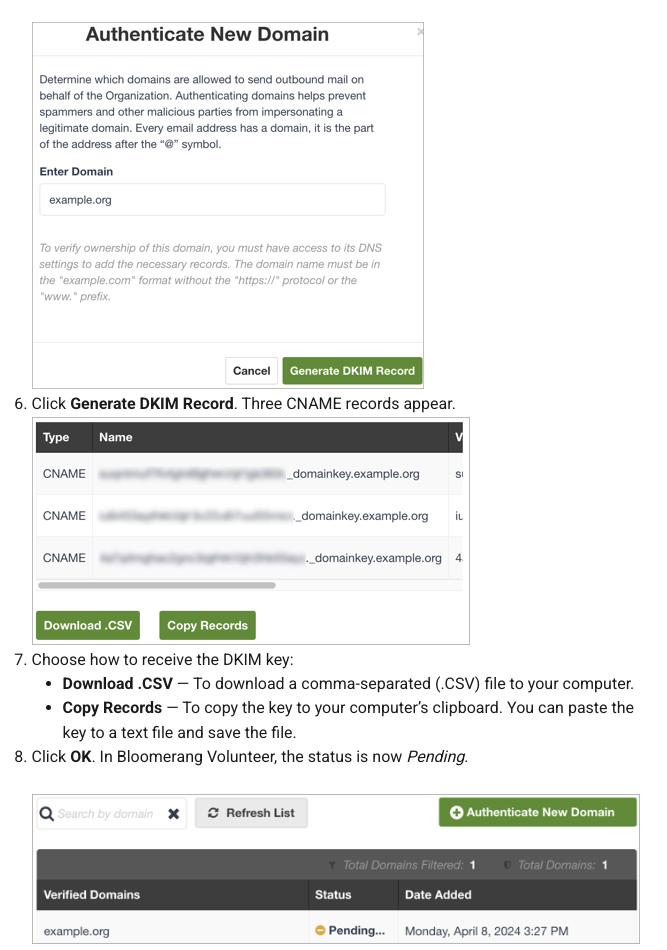
In the this case you could either send us the download.csv file as an attachment to your ticket, or, you could copy and past the three cname record values and those to us in an email/form submission.
CNAME - 123456789._domainkey.example.org
CNAME - abcdefghijk._domainkey.example.org
CNAME - 1234agaeqq._domainkey.example.org
What default records does NAMI EasySite add for us?
When we set up your website for the first time we generally add the records below, plus any other records that came from your old host, or are needed for email, or other purposes.
A Record
namiyouraffiliate.org - the 'root' record of where your website files are located (your content). Connects your domain name and content to a server IP address in a worldwide directory, so that the rest of the world can find your website.
CNAME Records
www.namiyouraffiliate.org. (to make sure 'www' works for your website)
TXT Records
api._domainkey.namiyouraffiliate.org. - aka dkim, verifies that email sent from your website is authorized
_dmarc.namiyouraffiliate.org. - another email record that helps protect against spoofing and phishing when other checks fail
SPF TXT record - sender policy framework - identifies which servers and/or domains can send email from your domain.
Think of SPF records like a guest list that is managed by a door attendant. If someone is not on the list, the door attendant will not let them in. Similarly, if an SPF record does not have a sender’s IP address or domain on its list, the receiving server (door attendant) will either not deliver those emails or mark them as spam.
I (or my IT person) would like access to my DNS records. How do I do that?
Simply open a ticket at https://help.namieasysite.com or from the backend of your website and request it along with your domain and the email address that should have access. We'll add you as a member of the Cloudflare account. Please know that we're always available to make any changes needed to your DNS records, and this service is included in your subscription with NAMI EasySite.
Was this article helpful?
That’s Great!
Thank you for your feedback
Sorry! We couldn't be helpful
Thank you for your feedback
Feedback sent
We appreciate your effort and will try to fix the article